Monday, 8 September 2014

Countdown to Warlords! - Making gold at the end of the expansion

Hi guys!

If you have any questions or need advice feel free to mail me at: wealthyonwow@hotmail.com or tweet me @wealthyonwow - You can also just comment on this post!

I am so psyched up to blog again, I have been playing beta and I've learned so much about making gold in WoD already! But today I want to talk about live, and making gold right now.

A lot of people (including me) were thinking oh well.. now that WoD has been announced, gold making is going to go out of the window.. GUESS AGAIN! 2 weeks ago, I made a level 1 alt to sell gems and enchants from, so I could track my progress... and low and behold:


88k in 2 weeks? WTF? I know, I thought I was dreaming too. Now first let me point out that this is not the case for all realms, or all gold makers, I just set myself up to make the optimal sales.

I see you there, rubbing your hands together thinking "AH-HA! Now I can afford my challenge mode boost!", well maybe.. just maybe.. you are right! Soo without further ado I will now explain what I have been doing.

PLEASE NOTE TSM USERS: My TSM is currently broken, it will not load realm data in any forms so none of my automated crafting addons work. Therefor I am doing everything manually, but you are welcome to simplify the process if your TSM is working fine.

YOU WILL NEED:

- TradesSkillMaster addon collection (yes, all the sub-addons too)
- FarmIt2 addon
- (Optional) a bag addon - I use Bagnon
- (Optional) a mail addon - I use Postal
- (Optional) an inventory sorter - I use Jpack
- An internet browser (I assume you have this if you are here...)

So let's start!

1. You are going to need to know what are the best gems and enchants to sell on your realm.. so off we go to the internet! You will need to visit:

www.wowuction.com  <-- best site ever, especially as TUJ is now offline.

2.  In the top right hand corner click to find your realm, then type it in the search box and pick your region and faction, this will load up all the data for your realm.


3. Click the professions tab and choose whatever you want to use, I am using jewelcrafting for this guide.


4.  Click the second tab "product analysis" to load information about all the jewelcrafting items.


5. Click the arrow under "Sold/day" to sort the table of items by the most popular items that sell the most each day.


Et voila you have an awesome table showing you exactly what sells on your realm and if it is profitable to craft! So we have this bunch of information, now what do we do with it?

6. Back to WoW! If you have installed FarmIt2 you should notice a little bar in the middle of your screen with + and - to add or remove slots in the bar. Seeing as this isn't a tutorial on how to set it up (I'll do that another time) if you type "/farmit config" it will show you what you can do with the bars.

With a bit of messing about you can have a neat layout. What I have tried to do here is to make a huge table of all the gems and enchants that sell 6+ of on my realm per day, it's up to you how you sort yours out.


Now if you go back to your WoWuction table, you can see how many of each item sell per day. This is a little hard to explain but in order to make the table above here is what I did:
- on WoWuction type the name of a gem EG Primrodal Ruby in the search bar
- sort it by sold/day
- if it sells more than 6 a day I drag the gem onto my table in-game
- I put the gems in order from left to right of what sells the most to what sells the least

So in the above picture, all the gems sell 6+ per day and the most popular ones are on the left and the least popular are on the right.

7. Now I aim to have 20 of each item in my table when I "restock" so I relog to my JC or Enchanter and make enough so I have 20 of everything for my level 1, as to not go higher than a stack and waste space in my bag. You can use the TSM restocker but as I explained it's broken for me so I do it manually.

8. So now I have everything ready to sell I just have to sell it. Again I'm sorry but this isn't a tutorial for TSM, I will do one of those another time. But I make groups seperately for each gem and set the minimum price the same as the uncut gem (as my 15% proc chance from transmuting covers the AH fees) I set it to post 4 stacks of 1 of each gem for 12 hours, it's not worth posting for more than 12 hours as you will get undercut. It's up to you what your normal/max price is I go for around 300-500g


9. So now I have my gems, my TSM set up and I'm ready to post. I will repost my auctions maximum once every 15 mins but obviously you don't need to do it that much, I am just trying to maximize my profit as I get undercut a lot. The more you repost the more you sell, I have made 20k on a reset day from camping the AH with gems and enchants, or 2-3k if I only post once.

So post away and I hope you sell some stuff! You should only be posting the best things that sell on your realm so, hopefully you should make some gold!

I am sorry that this guide is quite simple, but if it was a wall of text it would probably be quite boring.

If you have any questions or need advice feel free to mail me at: wealthyonwow@hotmail.com or tweet me @wealthyonwow - You can also just comment on this post!

Thanks a lot guys!

Raenboe

Sunday, 6 April 2014

Two good bits of news!

Hia guys!

So got some good news :D firstly, I've gotten upgraded internet.. so I will be able to attempt streaming again at some point! It's about twice as fast as it used to be so.. I'm really happy about that.


Secondly, Warlords of Draenor is closer than ever! So much information is being released lately and I'm so excited about it all. Soon I will be able to share with you what to expect from WoD in terms of gold making and show you how to prepare for the new expansion!

Fingers crossed it's gonna be awesome.

Time to set up the ole' TSM..

Friday, 24 January 2014

Niche Markets Guide - Vendor Items

Hia guys,

Raenboe here once again! Apologies for the lack of good screen shots during this post, I am not using my own pc to write this, so I am lacking half of my price data :)

Today I was going to talk about one of the more secretive subjects of gold making, which is niche markets. Basically what that means is, a small and unusual market that not many people are aware of, but can be huge gold makers if they are dominated.. and with little competition that is not difficult to achieve. Niche markets can vary from server to server, but always revolve around similar items. From recipes and tools, to other miscellaneous vendor items.. there are plenty of market areas out there waiting to be taken advantage of but most of them aren't common knowledge.

I want to talk to you today about some of my favourite markets as well as a few I haven't personally tried but have only heard good things about. Now remember, some of these markets may not work for you because prices and demand varies from server to server so make sure you do a little research before hand to see what the prices are, how many people are selling them and how often they sell. You can do this at a site like wowuction.com

I am only going to show you a few markets, as not to give the whole game away.. it will be up to you to find your own market and dominate it!

1. Profession Items (from vendors)

Believe it or not, one of the best investments to make when you are new to the game is into profession items to resell. For example, tools such as mining picks, skinning knives, herbalist spades, jeweler's kit and all those cheap reagents like vials, vellums, threads and dyes.. can all be resold for a hell of a markup!

You may think that these items below are all worthless, but guess again.. have a look at any auction house and be prepared to be amazed!


That's half a silver... turned into several gold, talk about a profit! For a low level new to the game, that could pay for your mount training and then some!


I have personally sold a Mining Pick for 100g once.. it does happen, people don't know where to find things and are too lazy to look it up.. so the auction house is a mere inconvenience but necessity to them.


You can never have enough enchanting vellums or vials, especially before raids players will try to stock up ASAP even if that means buying from a vendor.

2. Recipes (from vendors)

There are hundreds of NPCs around WoW that sell limited items and one of the best items to invest in are recipes, especially ones used during leveling up professions. You can find out the most popular recipes on websites such as wow-professions.com and look up where to get them!

You should pretty much buy at least 1 of any recipe you come across however, as chances are even if it only costs you a few copper.. you will still make a few gold off of it. Some recipes are even worth thousands if you are lucky but.. I haven't got that far into the market yet.

I often just fly around azeroth going to every NPC I see and pick up any recipes I come across, I guarantee you will make a few hundred gold with just a 10 minute fly around a continent.


This recipe only costs 6 gold from a vendor.. and if we have a look at what it's on the auction house for.. BOOM over 100 gold profit, which is a lot for a few minutes of nothing.


3. Vanity Items / Clothes

Last but not least for now, vanity items and clothes. Everyone is constantly looking out for cool items that will make them appear more badass, if you don't want to be covered in bling then there is something wrong with you my friend. So look no further.. than vendors and professions! Especially old content items sell well.. for example edibles include Elixirs of giant growth, deviate fish, deepstone oil... and of course potions of illusion, with cheap mats that can cost you a few silver or a few minutes to farm.. the rewards can be great, some items even selling for up to 50 gold each.


If you want to explore the market a bit more, you can try items such as toys.. lenses made via jewelcrafting and even some handmade clothes like shirts and head items (monocles).

But it's not only crafting that can net you the money.. what about vanity items? Ever heard of the Formal Dangui? OF COURSE NOT! It's an extremely rare item, that is rumoured to only respawn only once every 2 months to 1 NPC in this game.


It's referred to as the rarest common item in the game.. which isn't suprising, because considering it is a white item that costs less than 100 gold, it can resell for up to 50k on some realms.. and there is rarely more than 50 up for sale in the world at any time. So if you are flying by moonglade and pass Geenia Sunshadow.. do yourself a favour and check to see if she has this lovely gown in stock!


There are many more markets and items you can look out for, but I will leave that up to you..

Thanks a lot for reading guys! Check out our website @ www.worldofgoldcraft.co.uk and we will be streaming on Sunday night @ twitch.tv/xraenboe

Got a question? Email me at wealthyonwow@hotmail.com or drop me a tweet @wealthyonwow

Thank you all so much for the support, see you soon!

Raenboe & Glanyx

Thursday, 23 January 2014

How to set up the TradeSkillMaster Desktop Application - Never have to scan your AH again!

Hia guys,

I didn't manage to make a video last night because I managed to hurt myself a lot at work the past few days and needed to recover. I've made one today though and hopefully I can catch up and make the other one asap.


This one explains how to set up the TSM desktop application to make your life easier!


Be sure to check out our 31 day gold making project @ www.worldofgoldcraft.co.uk

<3 Raenboe + Glanyx

Thursday, 27 June 2013

Two more videos & graphics card incoming!

Hey all,

Just ordered my graphics card finally WOO! Thank you to those who donated towards it :) I really appreciate it. I have released two more videos for those who are interested. And hopefully this time next week I will be streaming ^^!


Thanks all I really appreciate the support!

- Raenboe

Friday, 14 June 2013

Calling all EU WoWers!

Ello!

Just a short post, to mention that my level 25 guild is up and running now. So for anyone that is homeless, or wants to learn to make gold, you are more than welcome to join. I'll happily give advice and help you with any gold problems, as well as the usual guild social stuff, if you are already on Stormscale then woop :P if you are not, then you are welcome to make a level 1, purely for chatting purposes, as long as you log on every week or so. Advanced gold makers are welcome to join too, if they want to share their knowledge.

If you are interested in joining, you can whisper me on Stormscale EU Horde side, the guild is called Wealthy on WoW and my toons are called Raenboe, Tufts and Obsolette :)

Hope to see some of you guys around!

Raenboe

P.S I will be hopefully getting a graphics card next week.. as I am black screening every 30 mins or so now (ack!) so the stream will be up soon I hope.. ^^

Wednesday, 12 June 2013

The first of many gold making lessons!

Whats up all,

I've started on a series that will teach you all about gold making. So far I've made lesson 1 and lesson 2 will be up within the next few days. This is the total basics of gold making, and it's not exactly "short" ;) but it is full of information for anyone who is lost or new to the game.

Sadly, my streaming is going to be delayed.. I have blown up my graphics card it seems, so I need to raise £80 to buy a new one (which is what people have been recommending to me). I am stupid when it comes to hardware, so my current card is an old Nvidia Geforce GT 230.. and I've been told by several people to upgrade to a AMD Radeon 7770? I don't know if that's good or not, but I have to upgrade my card if I want to stream! :) I've had a bit of donations recently (I really appreciate it, for the new card) but you guys aren't leaving your WoW names or anything so I can't say thanks :( I'd love to give out personalized gold lessons suited to your realm, for those who donate.. so if you are one of those who didn't leave a contact method/name, please get in touch!

Anyways here is the video, as I said.. if you are not new to gold making you may want to skip this one ;).

Again, thanks for all the support!

- Raenboe


Sunday, 9 June 2013

TSM and the glyph market!

Hi guys,

So I decided to try the glyph market on my new realm, having never done it before. I used TradeSkillMaster and I made a video to share what I have learned. This is my first WoW tutorial video so I am sort of clueless :P I hope it helps you thought!


---------------------------------------------------------

In other news,

I have decided that I would like to start streaming on twitch.tv. This is because the EU barely has any streamers, and I don't even know if it has a gold making stream (I can't find any info on one). So a week or so from now, I will be streaming at twitch.tv/xraenboe if all goes to plan! That way I can show you up close what I do, and answer any questions.

Hope you are enjoying the sun if you've had any!

Friday, 31 May 2013

A new home.. again o_O

Hello all,

Just wanted to let you know I have managed to relocate an alt to Stormscale :) and planning to move more in the future. I am hoping to be able to save up for some TCG mounts! Just as a bit of a teaser as what's been going on.. here are my sales for the first 24 hours on the realm. (Click on it to make it bigger).


Will keep you updated and do a proper post tomorrow when I have the time!

- Raenboe

Wednesday, 22 May 2013

[Guide] Tradeskillmaster Auctioning Part 2! Cancelling & Resetting.

Hello again!

Thanks to GrĂ¡inne for recommending this post! If you missed part 1 of my guide to TradeSkillMaster Auctioning you can find it here. So after running through how to to set up TSM auction groups and how to post them, I'm going to cover how to deal with undercuts by cancelling and resetting.

So, you have posted your auctions up and you are waiting for them to sell. But wait.. someone has posted the same item for cheaper, now theirs could sell before yours! This is called "undercutting", when a player lists something cheaper than you have listed it. So how do we deal with this? Well luckily TSM has a cancel auctions feature which can help you deal with undercutters.

So let's start.. how do you cancel scans? Firstly open up your Auction House, then click on the TSM tab followed by Cancel Auctions.


Your TSM will now scan your current auctions and list information on each auction.


At the top it will list how many auctions it wants to cancel according to your settings. The information stated can be any of the following:

- The first arrow (pink) states "You've been undercut", this means someone has undercut you and TSM is going to cancel that auction to repost later.
- The second arrow (green) states "Cancelling auction which you've undercut", this means you have undercut someone who has undercut you (tongue twister!), therefor TSM will cancel your originally undercut auction.
- The third arrow (yellow) states "Not cancelling auction below threshold.", this means the item that has undercut you, is cheaper than you have specified in your threshold for that item, therefor TSM will not undercut it and will leave your current auction up (although it has been undercut). You can change the behaviour of this setting in your group override.
- The final forth arrow (red) states "Your auction has not been undercut", which is exactly what you want, means you are the cheapest on the AH!


So go ahead and cancel your auctions by clicking on cancel, or use the macro we talked about in the previous post. You can always skip an item if you don't want to cancel it (remember the current item is displayed in the top left of the screen). Now you can go and collect your items from a mailbox and run another post scan to list them as the cheapest!

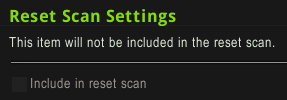
Now another feature of TSM auctioning is the reset function. For those who don't know what resetting the market is, it means to buy out all the items and relist them for a higher price, similar to flipping, but usually with larger quantities. I have personally never used this part of the addon before so it will be a learning curve for me too! Let's get started. If you go into the Group Overrides for one of your groups, you will see this right at the bottom of the screen.


By default this option is disabled, but by right clicking to unlock it and ticking the box, you will reveal a whole new load of options. Don't panic.. we can do this! For my test run I'm going to use shadowgem, because it is one of the gems I have been talking about lately and it is cheap, and fairly easy to reset.


Ok so we now have quite a few options but they are pretty easy to understand. You will want to set them up according to your own realm.

- The first option is "max reset cost", this is the maximum amount of gold you want to spend per item in your group, to reset the market. As for gems I usually give them separate groups, so this means I am willing to spend a maximum for 1000g to reset the shadowgem market. I chose 1000g because I am happy to invest in large amounts of items I know I can sell.

- The second option is "min reset profit", this is the minimum profit you want to make from each single item. Mine is set to 5g, this means TSM will not buy a shadowgem unless I can make 5g or more profit from that single gem.

- The third option is "max quantity to buy", now mine is 100 because I often deal in bulk amounts and investing comes naturally to me, I recommend not having a number like 10 because I doubt there will often be so little gems on your auction house, and even if you set it to 100, if you buy them 1g each that's only 100g spent.

- To the right, the fourth option is "price resolution", this is basically how much you are willing your numbers to be adjusted by, EG if you set it to 50s it will alter all your prices to allow for an extra 50s, so 5g and 5g50s are the same thing.

- Finally at the bottom, "max price per item" is how much you are willing to spend PER shadowgem. I know I can sell them for 20g on my realm so I am happy to buy them for 10g to make 100% profit, most players will probably want to set this to around 5g however.


 Hurray we're all set! So let's give this a go now. Open your auction house yet again and run the "Reset Auctions" scan.


 At the top of the screen it states your potential profit from the smallest reset you could do. In each line the scan states how many of the item you would be buying for the reset, how much you would spend in total, what price TSM is planning to relist it for and how much profit you will make per item.


Ok so this was the part that confused the hell out of me, because I have never used this feature before I didn't understand why my shadowgem was listed twice, and I couldn't find any information on it. After much hair tugging and temple rubbing, I think I understand now.

 There was a total of 67 shadowgems on my auction house. Several for 1.5g each, several for 4.5g each and several for 6.8g each. Because my minimum profit per item was set to 5g (+50s for the price resolution) the first line states that I could buy out all the 1.5g shadowgem and undercut the 6.8g shadowgem and still make that minimum 5g profit. So I believe this first line states the smallest reset you could do to make profit.

The second line tells me that I could buy out all the 1.5g/4.5g/6.8g shadowgem and relist them all for 20g each (that was my fallback price for shadowgem), so I assume this second line states the biggest reset I could do to make the most possible profit. I could be wrong.. because as I said this is my first test, but if I am wrong I will redo this as soon as I find otherwise.


So now you can go ahead and click which of the options you want to buyout, then spam the buyout button. I personally always go for the higher option so I click the buyout button without picking either one, so it buys everything. For those of you that don't want to manually click, you can use the following macro keybound to something. Unfortunately the default TSM post/cancel macro does not work for this.
/click TSMAHTabBuyoutButton
/click TSMAuctioningResetBuyoutButton
/click TSMAHConfirmationActionButton
Now just go and collect your mail and post all your freshly bought gems! Or whatever you bought.

-----------------------------------------------------------------------------------

In other news, here are a few other bits of TSM Auctioning you might want to know about.

Under "group overrides" you can find these two options.


The first one "common search term", means when TSM is scanning the auction house for items in that group, you can specify a term that is in all of the names of those items, to speed up the scan. EG if the group contains only glyphs, you should enter the term "glyph of" or if your group only contains enchants you should add the term "enchant".

The second one "ignore random enchants", means if for example you are selling transmog items or jewellery that has prefixes at the end of their names, such as "of the whale" or "of the panther" etc, TSM will ignore those so you don't have to add each of them to the group seperately. For example if you have "windwool bracers of the panther" and "windwool bracers of the wraith", it would only list the item as "windwool bracers" so you don't have to add them all individually. However it will still attempt to post each prefixed item as a seperate item. For example if you have the group that contains "windwool bracers" set to a post cap of 2, it will try to post 2 of each kind of the bracers.

-----------------------------------------------------------------------------------

So, my internet was down because my parents didn't pay the bill.. ha. So I dissapeared again, I had this post all planned out then I couldn't do it, but that's okay I did some rollerblading and I learned some Dutch too (well.. tried to learn it).

Unfortunately my deal with the player on a different realm of using their 100k and professions fell through, after a week of selling only gems I did get up to about 140k but then the players computer blew up, so they can no longer prospect for me and I have nothing to sell! So.. I have 0 goals on WoW right now, so if anyone wants to offer me something to do (that involves gold) I will most certainly jump on the situation!

If you have any questions, don't forge to tweet me @wealthyonwow, or email me at wealthyonwow@hotmail.com, I also have Skype which is Raenboe, if anyone has so many questions that they don't want to post them in the comments.

Thanks again for all the support! I'd appreciate any suggestions in the comments for my next post. I hope patch 5.3 is treating you well with sales!

- Raenboe

Saturday, 18 May 2013

Jewelcrafting, my #1 profession!

Whatsup!

So previously on my blog I mentioned lots of little bits and bobs about jewelcrafting and how I make money from it. Now I thought I'd go a bit more in depth and show you how to squeeze as much gold out of this profession as you possibly can. You can start rolling in the cash from as low as level 5, so don't be disheartened if you are new. Also I should mention that in some cases, you don't even need to be a jewelcrafter to make money, flipping some gems can pay off! Now where to start...

When picking professions on a character, it is often the case that two gathering professions (usually mining and herbalism) are much more profitable than crafting profession; at low level at least. This can be the case, however.. it can also be the biggest mistake you will ever make in your LIFE! Well, not really.. but you will miss out on a lot of gold and I will explain to you why.

Let me just state I sell EVERY Gem in stacks of 5! Just to get that out there.


Whaaaaaaaaaat? 250g for 5 gems? That aren't even from current content?! Yep, the gem market is busy and it wouldn't surprise me if most of you didn't know about it! Let us compare the first "tier" of all three gathering professions, and what the SECOND gather-able items sell for. These prices will not be the same on your server, but that shouldn't matter too much, you will understand later why I am comparing these.

Herbalism: Earthroot - 12g/stack
Skinning: Medium Leather - 60g/stack
Mining: Tin Ore - 22g/stack

Demand is what chooses the prices for these items, earthroot is practically useless where as medium leather and tin ore are both needed to level multiple (yes multiple, medium leather is used in other professions except leatherworking) professions. How would you feel if I told you, we could turn that that tin ore, could be raised from 22g/stack to up to 100g/stack? That would be neat for a low level huh? So let me show you how.


The above image is a list of what tin ore will prospect into. The addon Enchantrix is creating this list for me. There are three more common gems and three rarer gems. You will usually find these rarer gems are the common gems from the next ore up, in this case mithril ore will produce aquamarine, jade and citrine. The first gem on the list, Moss Agate, is commonly used for leveling jewelcrafting.. and as such, can be sold for up to 50g PER GEM on busy realms. And because a lot of people aren't bothering to prospect their ore, they just sell it in ore form or in bars, it means there is often a gap in the market, perfect to jump into! Lesser Moonstone is unfortunately not very useful, except for perhaps creating items to disenchant, but Shadowgem can sell for 10g each.

So let's do some math using the percentages we were given. You can get 1-2 gems per prospect (woo procs!) so you will end up with more than 1 gem per prospect. Let's say we do 100 prospects, that would require 500 tin ore. We would end up with 37.5 of each of the moss agate, lesser moonstone and shadowgem, as well as 4 of each aquamarine, jade and citrine. So let's calculate..

100 Prospects = 500 Tin Ore x 1.1g each = 550g --> So we have spent 550g on the ore.
37.5 Moss Agate x 27g each = 1012.5g
37.5 Lesser Moonstone x 0.9g each = 33.75g
37.5 Shadowgem x 7.5g each =  281.25g
4 Aquamarine x 15g each = 60g
4 Jade x 3g each = 12g
4 Citrine x 6g = 24g
Total = 1423.5g
Price different / Profit = 1423.5g - 550g =  873.5g --> That's an average of 35g profit per stack or 57g per stack if you farmed the ore.

So.. screw selling the unprospected ore! By refining the ore into gems, you are receiving more than double the money you would have if you sold the ore alone. Of course the gems may take longer to sell than the ore, but it's not like you need the gold straight away while you are leveling. If you are lucky enough to be on an extremely overpriced realm, you could have more than tripled your money!

Tin ore isn't the only ore this works with and as you can see you don't even have to mine the ore yourself, you can profit even by purchasing the ore! If you gathered the ore yourself, your profit margins would be bigger too. I recommend farming tin in Ashenvale, it is everywhere!


Let's try this again, but this time with Adamantite Ore. If you are going to farm this I would recommend Nagrand personally, but since cross realms came out it can be difficult to farm, so I usually buy it anytime it is under 100g per stack.

100 Prospects = 500 Adamantite Ore x 4.25g = 2125g --> Seems a lot, but don't worry!
100 Adamantite Powder x 42.8g = 4280g --> That has already paid for the ore and then some!
19 x Shadow Draenite x 37.8g = 718.2g
19 Blood Garnet x 37.8g = 718.2g
19 Flame Spessarite x 16.7g = 317.3g --> A horrible seller, never try to flip it.
19 Deep Peridot x 28.4g = 539.6g
19 Azure Moonstone x 37g = 703g
19 Golden Draenite x 15g = 285g
18 Blue Gems x 3g = 54g (I tend to vendor these gems because they never sell)
Total = 7615.3g
Price difference / Profit = 7615.3g - 2125g =  5490.3g --> That's an average of 220G profit per stack! Or 300g per stack if you farmed the ore yourself.

WhAAaaAaAt how come nobody ever told me about making gold like this? Well that's because people forget that low level materials are always in demand to players levelling their professions. And with more players leveling every day, not only are they buying materials, but they are also dumping their ore/herbs/leathers on the auction house for the cheaps, because they don't know their true value! (Below gems are in stacks of 5)


This prospecting can be done with all ores, I personally find tin and adamantite to be the best, but thorium and mithril are great too! I'd avoid iron and fel iron. Elementium and pyrite works alright, and of course ghost iron is great for mists of pandaria!


I assure you these gems do sell, I can make anywhere from 2-10k per DAY on them alone! Be sure to pay attention to the gems used for leveling and if you notice someone buying a lot of gems in a pattern stating they are leveling up, don't be afraid to jump into the action and flip the next tier of gems in preparation for their purchases!

I also recommend keeping an eye out on eternal earth, crystallized earth, black diamonds and adamantite/titanium bars to flip! They are all used for leveling.

To see the most popular gems used to level up jewelcrafting click here.
To see the profits for prospecting on your realm click here.

I apologise if the math is awfully off in this post, I am knackered and clicking on a calculator isn't my best skill!

-----------------------------------------------------------------------------------

So hi guys,

I know I've been gone for a week but I've been mulling over my whole WoW situation. The economy on chamber of aspects has shriveled up, I'm currently on a different realm doing this gem market. A lovely blog reader gave me an offer I couldn't refuse. He has given me 100k gold and access to all his professions, to see how much gold I can make in a month. Today is day 5 and things are going well, although I haven't emptied my mailbox of successful auctions.

My road to a million gold has sort of stalled, what with my guild disbanding and there not being any other weekend raiding guilds on CoA, I am stuck. I am torn between moving to a busy realm and focusing purely on gold, or moving to a new player realm to help new players (something I love to do!!). Moving 7 alts will be expensive though so it's not a decision I can take likely, as I will have to do it over a long period of time. As CoA has sort of died mysteriously, I feel that I will have to restart my goal to a million on a new server at some point, but for now I will just keep posting gold making methods and the money total in my post titles will disappear temporarily.

If you want to contact me, feel free to comment and I will always reply! You can also reach me @wealthyonwow (twitter) or at wealthyonwow@hotmail.com (email)! I love hearing from you guys, and the positive feedback has really given me something to smile about in the awful past 2 weeks I've had. I'd also like to give a special shout out to James for his generous donation! That will pay for a character transfer :) once I have decided where to go of course!

Thanks again everyone, I will be posting regularly again so stay tuned for some gold making magic!

Monday, 13 May 2013

Another update!

If you think I have vanished, you are mistaken!

Unfortunately I have had another bad turn of events.

1 - I am sick, cough, cold, sore stomach etc I don't have the brain power to even think about gold right now, let alone teach about it! :D
2 - My guild has decided to merge with another guild due to lack of players, which means I am unable to raid anymore because the raiding times do not suit me, there are no other guilds on this realm that raid weekends, and I just moved to this realm and I cannot afford to move off again, so right now I am sort of like UGH WOW, why are you doing this to me?

Bear with me a little bit while I recover my brain cells and figure out what to do in my current situation! Thanks,

- Raenboe

Friday, 10 May 2013

[Q&A] - Questions in 5.2 - [176k]

Evening all!

Lately I've been asked quite a few questions by friends, on forums and via email so I thought I'd do a bit of a Q&A section because I know a lot of people will be thinking the same things.

Q: How do you deal with undercutters? So and so is undercutting me by 100g and it's silly, I am not making profit!
A: Undercutters can be a pain or a blessing. There are several things you can do. Firstly you can buy them out, or leave them to run their course. If you buy them out and they stop posting, then you have a bunch of items to resell for profit, wahey! If they don't stop posting well.. that's a bigger issue. You may find this guy is trying to dump stock and soon he will be gone, or he is inexperienced in the market and when he realises he isn't making any gold he will stop. More often than not, the player will stop posting after a few weeks, although if you are too impatient to wait for this, you can try mailing or whispering him.. although that can end up in name calling and get you nowhere.

Q: Are you flipping any items right now in 5.2?
A: Yes actually, Haunting spirits are doing from anywhere between 10-13k on my realm right now. I was lucky enough to buy 4 in trade for 8k each and resell them for 12.5k each.. so,18k profit for pretty much nothing. Also buying I am buying blue 450 BoE weapons for >500g and reselling for 2.5k.. and they do sell well!

Q: How much gold do you make per day?
A: I can make anywhere from 0k on lazy days, to 50k on busy days.. although not all of it is profit. It really depends on the day and what items I sell, the majority of the items I sell are worth less than 500g though, so I have to sell a LOT!

Q: How often do you post/cancel auctions?
A: It depends, if I am away from home then I can go as long as 30ish ours without posting them. If I am at home I usually leave my pc on and post/cancel every hour or so, keeping WoW on in the background just for that reason. On Wednesdays and Thursdays I will be posting/cancelling every 10-15 mins as those are busy times to make the most sales!

Q: What can I sell with my professions?
A: Check out this list I made for 600 professions on a previous post here. If you are not yet 600 then do not fret, I will be making guides for lower level professions soon!

Q: I am new to WoW, how do I make gold?
A: So much to say, so little space. To start off with, don't vendor anything, try and sell everything you can on the auction house. Also buy bigger bags as soon as you can, netherweave bags are pretty good. Always greed green boes in dungeons because they will more than likely sell for more than the enchanting materials. I will do a bigger post purely covering new players soon.

-----------------------------------------------------------------------------------

As you can see my gold has jumped up a notch! I did take a risk with those haunting spirits and 18k profit paid off! Not to mention I got another spirit from raiding ;) woo for enchanting! Hopefully I will hit the 200k mark sometime this week, and then I will be 1/5 of the way to a mil, huzzah!

I hope the new look isn't too harsh on the eyes, I've had a mixture of feedback on it. If you'd like to comment on anything on the site, or suggest things, there is a poll on the right hand side of the homepage and you can tweet me at @wealthyonwow or email me at wealthyonwow@hotmail.com

A small shoutout to my guild Misanthropy on Chamber of Aspects (Horde) EU! We are recruiting some DPS for our heroic raid team (currently 2/12hc) we need a rogue>mage>deathknight>warlock. If you are interested in joining or would like to have a nose about check out our guild at http://misanthropy.guildomatic.com/

Thank you for all the support guys, and I hope your Wed/Thurs made a nice bulge in your pocket!

- Raenboe

Thursday, 9 May 2013

[Guide] Trade Skill MANIAC and how it saves time (Auctioning) - [120k]

Hi guys,

Apologies for the break but now I am back to fill your brain with gold making material! Today I want to talk about the addon "Trade Skill Master" or TSM, and how it can make your auctioning life so much easier.  You may have heard of it before, most top gold makers use it. TSM has several different sections, each which have to be downloaded separately. For now I will only deal with the "Auctioning" section. This allows you to customise your auction posting in ways you didn't think possible! It is difficult to explain, but basically with a click of a button and a scroll of your mouse wheel, you can post/cancel all of your auctions in seconds!

So to start off with, once you have installed "TradeSkillMaster" and "TradeSkillMaster_Auctioning", upon login or opening tsm you my get asked if you want  "beginner or advanced".. you want advanced! Secondly, make sure you have a few items you want to sell in your bags, then type /tsm to open the interface. For each section you have downloaded you will have an icon along the top, for now click the golden coin.


This is the category in which you will be setting up your auctions. This includes the items you want to sell and the prices you want to sell them for. On your left, underneath the golden coin, these below options will appear. They allow you to sort your items into groups and price them accordingly. For example, I may want to make a group for all of my Tailoring PvP armor and sell it for 500g each.. let's try and set that up.


 If you did get asked about hiding "advanced options" earlier, and you clicked no, then you are fine. If you didn't get asked it, then click on options and make sure that the below box is unchecked.


Now click on the "Categories/Groups" followed by "Create Category/Group" and under "Group Name" type in whatever you want to call your group, in this case I want to call mine Tailoring PvP. Once you have chosen your name press okay.


Your group should appear to the left of the screen under Categories/Groups. You can always change this name later under the groups management. Now click on your group.


Once you have opened your group make sure you are under the tab "Add/Remove Items". Now you must select the items you want to add to this group, I am adding all of my crafted tailoring pvp gear obviously. Once you have selected each item, click the "Add" button to add it to your group.


Congrats! You now have your first group of items, now we need to set up the group. Start by clicking on "Group Overrides" You will come to a page with a LOT of options.. do not worry, most of them are pretty obvious to understand, but will not affect you at this time.


You shouldn't really need to change anything under General settings, so scroll down to "Post Settings". Here you may want to change a few things. You need to right click the options to "unlock them" before you can enter in your own data. Obviously there is the post time, for my armor I prefer 48 hours but it is personal preference. Post cap is how many you want to post at any time, again I prefer 1 only for armor. Be aware if you are undercut by another player, the addon will then post the "post cap" number again. So if I have my post cap set to 2, it will post 2 items, if I am then undercut, it will post another 2. There is also a 3rd option called "per auction" which basically means do you want to sell single items or stacks. This doesn't apply for armor as it doesn't stack, but for materials like ores you may want to set it to 20.


Ignore "General Price Settings", I highly recommend leaving it to only undercut by 1 copper, it is silly to undercut by more because you will still be the cheapest, even if only by a copper! So head straight down to "Minimum Price Settings (Threshold)". Now choose your threshold! Your threshold is basically the cheapest amount you will sell your item for. If the price on the auction house goes lower than that threshold, the addon will not post the item. I chose 100g because although the mats for my armor are only around 50g each, I still want to make some profit! I would recommend leaving the "Fixed Gold Amount" because you don't know the addon well.


Last but not least, the final option is "Maximum Price Settings (Fallback)". Now choose your fallback price. Your fallback is the highest amount you would sell your item for, or the price it would fall back to, if for example there are none of the item you are selling currently on the Auction House. By default it is 1000, but I find this a bit much. Most items will be safe around the 500g mark, although some are worth a lot more. I am fine with 500 for my PvP armor because 450g profit is really nice! Again, leave the fixed gold amount.


Huzzah you are done setting up your group! Now it's time to reap the benefits and post your auctions. Once you have set your group up, you won't have to do it again, it may seemed to have taken a while but in the long run you will have saved a lot of time! Now press close on your TSM and go to the auction house, once you have opened it click on the TSM tab in the bottom right and press "Post Auctions" in the top left.


Your TSM will now start to scan your Auction House, see what items are in your bag and price them accordingly. After a few moments it will give you a brief summary of what it has found and from there you can decide what to do.


At the top it will state how many items it is able to post from your bags. It will then list the item, with their current lowest price, their seller and what course of action it will take.
 - The first arrow (red) states "Undercutting competition", this means it will post your auction for 1copper (or your set amount) cheaper than the cheapest item currently on there.
- The second arrow (orange) states "Posting at fallback", this means there are none of this item on the auction house so it will post it at your set fallback price (mine was 500g).
- The third and final arrow (blue) states "Cheap auction below threshold", this means the cheapest item currently on the auction house is lower than your set threshold, therefor it is too cheap to post your item, and it will not post it.


Feel free to make any adjustments to your group settings back in /tsm if you want to change your prices, otherwise press the post button at the bottom. Each time you press post it will post one auction. If you spam click the button it will post all of your auctions. Once all of your auctions have been "posted" it may take a few seconds or so for the server to process all of your items and then they will dissapear from your bags! And you are done, hurray!

You can do the exact same thing with the "cancel auctions" below the post auctions button. This will scan your items for any undercuts, and cancel them accordingly! But if you want to make posting/cancelling auctions even faster.. there is one thing you can do!

If you go back to /tsm and "Auctioning Groups" and "Options", scroll down and you will find the following.


This macro allows you to choose a keybind to post/cancel your auctions. Once you have picked your preferred combination of buttons, press create macro and voila! I personally find I have to drag the macro onto my bars for it to work, when dragging it the icon will appear invisible but when you drop it on your action bars it will appear. Now use your combination of buttons, and every time you scroll your mouse wheel madly it will post and cancel all your actions! Such a timer saver!

I hope this tutorial has been useful to you, it may be long and perhaps confusing, but once you learn how to use TSM it can make you a lot of money. Ever wondered how people post so many auctions and undercut you so fast? Well there you go!

I ended up spending 27k to reset the gem/enchant market yesterday, and only made 22k back.. so my gold has indeed gone down, but now I have ended up with a lot of (almost) free gems to sell, so hopefully my gold will go back up! Thanks for reading and have a wonderful day.

- Raenboe

Tuesday, 7 May 2013

Update

Hi guys,

Sorry to say there will not be a post today and possibly tomorrow. Reason for this is my cat has passed away my grandmother has been put in hospital so I'm a little shaken and not focused right now and my gold making will be taking a hit. I will do my best to try put a post together tomorrow but today it's unlikely to happen. Thanks for understanding and I apologise!

Raenboe

Monday, 6 May 2013

Appeal to the lazy, with profession kits! - [125k]

Hi again!

So as I previously promised, today I'm gonna tell you guys all about profession kits and why they are a great business for anyone to try out. Although they can be profitable, I wouldn't recommend them as your only source of income, due to the unpredictability of sales. So let me cover the basics and tell you how to go about selling them.


Q: What is a profession kit?
A: A bundle of materials, that when used to craft items while following a guide, will get you to a predetermined level in your desired profession.

Q: Are they difficult to make, how long does it take?
A: It depends on the profession, some kits contain up to 6,000 items whereas others only contain 1,300. I wouldn't recommend farming all of the items as some are usually available for cheap amounts. I personally buy about 80% of the materials for my kits, and farm the rest. If I buy everything I can assemble it within an hour, if I farm EVERYTHING it can take anywhere from 4 hours to several days for the more difficult ones.

Q: How much do they sell for?
A: The most I have sold a kit for is 22k, which was Enchanting.. but usually I sell them for around 15k. Within 6 months on a dead realm I sold almost 30 kits which averages at 450k over 8 months, I would say about 250k-300k of that was profit. That is barely over 1k per day, but if you don't have time to list auctions then this method is a good way to make gold.


Q: How did you go about selling them.. and did they sell?
A: I advertised my kits in trade anywhere from once to five times per day, I also had a forum thread on my realm forums which is where I got most of my sales from: http://eu.battle.net/wow/en/forum/topic/5326942875

Q: How did you trade the kits?
A: Usually it was trust trades, which can be difficult because if you do not have a reputation on your realm people will not trust you. You can also use C.O.D if you can divide the price per mail, or you can let people withdraw from your guild bank. I was lucky enough to have a reputation, people paid me when they ordered, before I even had the kit!


Q: Can you mention what items you farmed?
A: Tin ore for Moss Agate in Ashenvale, Adamantite ore for the gems and dust in Nagrand, Goldthorn in Stranglethorn Vale, Netherbloom in Netherstorm, Nightmare vine in Shadowmoon Valley, Cobalt Bars in Zul'Drak, Elementium/Obsidium ore for bars in Deepholm, and i'd prospect the elementium, make green jewellery and DE them for hypnotic dust.

Q: What advice would you give for selling kits?
A: There are several tips I have:
  1. Make sure you have PLENTY of room, some kits will need five guild bank tabs, others will need only one. But you will need storage for all of the spare materials you have.
  2. Use Auctionator to create shopping lists for the items each profession kit contains, I highly recommend making kits from the items specified on wow-professions.com
  3. ALWAYS include 5-20 extra of each material than the guides specify, unless you are certain the person will be guaranteed the correct number of level ups from that recipe, some recipes will be yellow and may not grant a level. Better safe than sorry!
  4. Don't be put off by people saying you have ridiculous prices and they won't pay that, I usually sold my kits for around 250% of the materials price, a lot of people complained it was too much.. but if you sell them cheaply there is just no point, you will not make any money and it will be a waste of time. There is always someone willing to pay otherwise I wouldn't have sold 29 kits.
  5. If someone is already selling kits on your realm, then don't even try. Realms usually are not big enough for 2 sellers, it is difficult to price competitively and you will not get enough customers.
  6. Remember to specify what level kits you do. I personally only did 1-525 because MoP materials are pretty worthless and easy to get, but this may be different for you.
  7. Act classy! if u type like dis, then NOBODY will be interested. Have a professional trade advert and make a forum thread. When people buy kits, encourage them to leave positive feedback on your thread, so future customers are more likely to feel comfortable with trust trades.
Overall, profession kits are great to sell if you do not have time to play WoW. Just leave your forum thread up, bump it occasionally and wait for the messages and mails to come in every week or so. It's a good idea to farm kits before you sell them at the start, so you get a reputation, once people trust you.. you can farm to order. I usually had every kit unless I had just sold one I'd wait a week or so before making it again.

If you are still a little unsure about how to lay things out, then don't forget to check out my own personal profession kit thread up under "How did you go about selling them?"

--------------------------------------------------------------------------------------------------------------------------------------------------

Again, my gold total has not gone up much. I have spent today packing my things into boxes and repainting walls in preperation for selling my family selling our home soon. I am not too worried because Mondays are usually pretty quiet for sales, but tomorrow night things will start to pick up again, so I will be ready and stocked!

If you have any questions about my posts, feel free to leave them in the comments or check out the twitter I made @wealthyonwow .. there is nothing on it as of yet, because I've been so busy! If neither of those things appeal to you, you can email me at wealthyonwow@hotmail.com!

Thanks again for reading my blog and I hope you have learned a few things and made some gold!

- Raenboe